
Image by Bonus Action
When it comes to drawing tablet brands, Wacom is a household name, and many strive to afford what is considered the industry standard – A Wacom Cintiq. However, for those still working up to the premium price the Wacom Movink 13 drawing tablet offers a portable option perfect for students and younger artists.
The Movink 13 is one of the lightest tablets I have ever drawn on. It’s extremely thin screen and small desk footprint are ideal for those with limited space. The OLED screen delivers a bright, colorful display, though the low pixel count does put it back against the 4k drawing monitors in similar price points from other brands.
The Movink 13 has a combination of pros and cons but delivers on the quality Wacom is known for in its drawing monitors.
Key Details
- Developer: Wacom
- Price: $749.95+
- Complete Size: 13 Inches
- Active Drawing Area: 11.6 x 6.5 Inches
- Display Resolution: 1920 x 1080
- Screen Technology: OLED
- Pen Pressure: 8192 Levels
- Aspect Ratio: 16:9
- Sample Provided For Review: Yes
The Slimmest Drawing Monitor on the Market

I have used Wacom drawing technology for decades, from my first Intuos in the late 2000s, to the Wacom Cintiq 13 HD that was my primary drawing tablet until last year, when I switched over to the Wacom One. Because of this, I am deeply familiar with how Wacom functions, the quality it delivers, and the overall sleek designs and builds of products over many years.
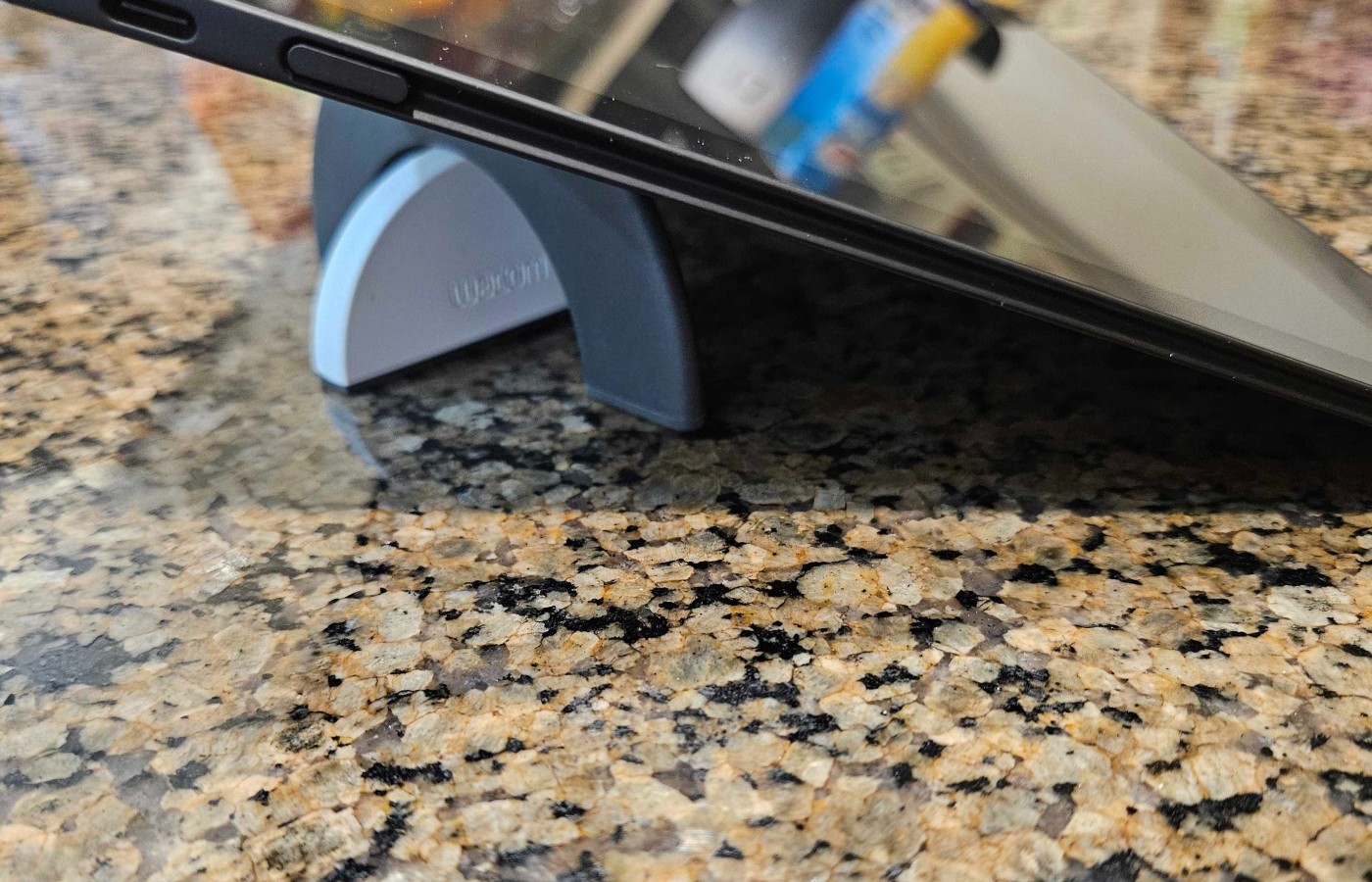
While I thought the Wacom One was a huge jump in portability from my old Cintiq, weighing nearly half what the older monitor did, the Movink is on a completely different level. This tablet is so thin that as I was unboxing it, I was anxious it might feel breakable. The entire thing weighs less than a pound and, when laid on a flat surface, is so thin there almost is no lip between the drawing screen and a counter or desk.
While the Movink definitely doesn’t have the reassuring heft of my old Cintiq, it doesn’t feel particularly fragile. You’ll definitely want a hard zipper case for it if you put it in a backpack or take it on a trip, (anything for a Chromebook would be about the right size), but it doesn’t bend or wobble like I was anxious it might.
The portability and light weight of this tablet are recommended for students or anyone who travels regularly but needs a quality tablet for work.
The Wacom Movink Lacks Accessories Out of the Box
The Wacom Movink 13 is not a self-functioning drawing monitor. This means you need to be hooked to a PC running drawing software for it to function. It can also be used with a phone, but I found that doing so made my phone get very hot, so I switched to my laptop.
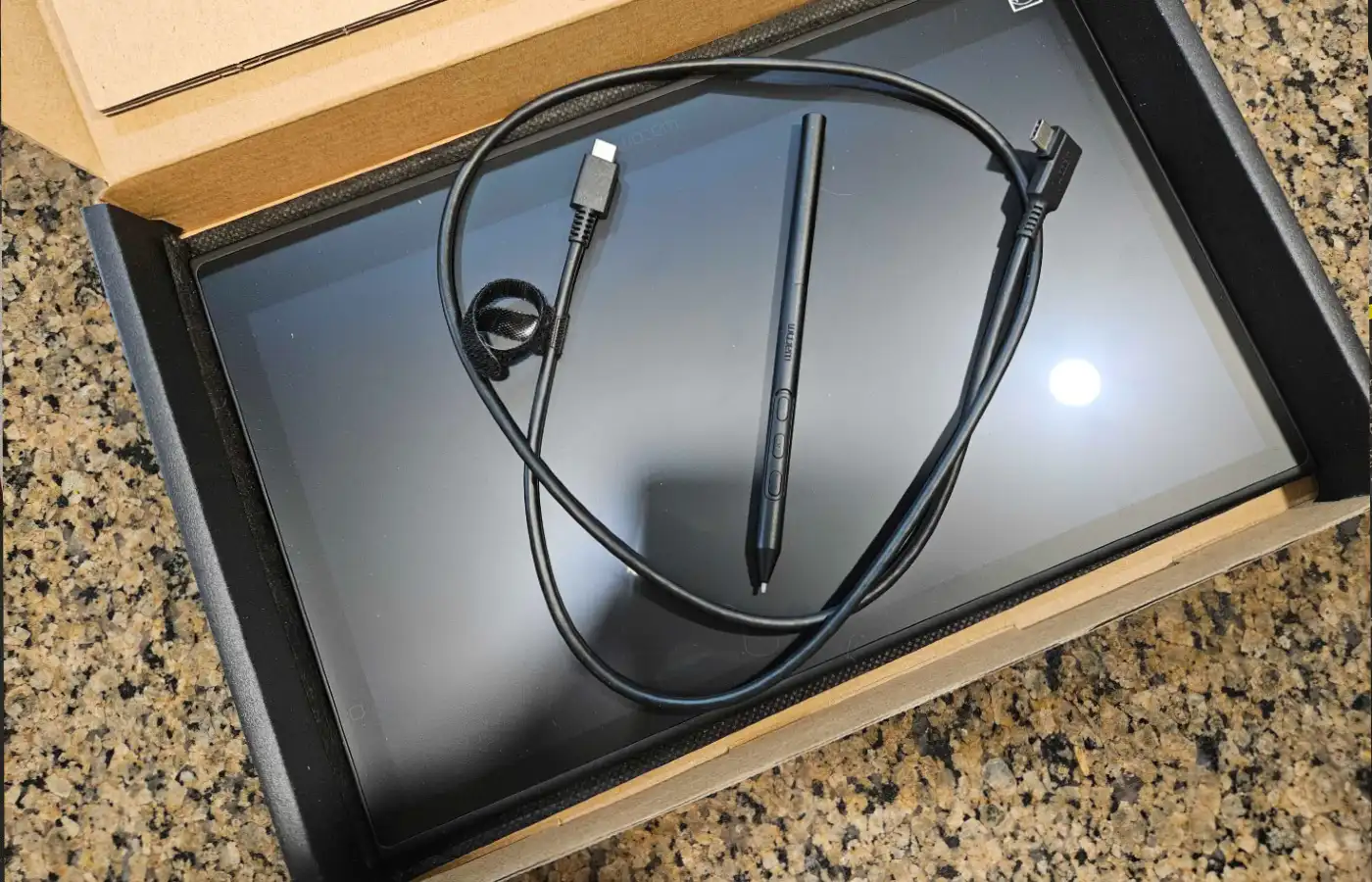
That was where I encountered my first hiccups with the Movink. Like most of Wacom’s current products, this drawing tablet comes with no bells or whistles. When you open the box, you will find the tablet, a single, short USB-C cable, and the stylus. There is no pen case, no additional dongles or attachment options, and only three total nibs inside the stylus barrel.
For the price, even just a pen case with a few more nibs would have been very welcome. At nearly $800, it is only a few hundred less than my original Cintiq had cost, and that came with a stand, a pen holder, dozens of nibs, and all the attachments needed to work with any setup.
For me, I was unable to use this tablet on my PC tower, as it doesn’t have a USB-C video card option. This meant working on my older laptop instead since I don’t have the cables needed to run the tablet through HDMI.
The other issue I encountered was a lack of drawing stand. Whether working digitally or traditionally, few people enjoy drawing with their canvas completely flat on the surface. It creates issues with perspective and isn’t particularly comfortable.
Unfortunately, the Movink 13 also doesn’t come with a stand.
I was very fortunate to have the circle stand that came with my Wacom One, and that worked well for propping the little tablet to a more comfortable angle. I would highly recommend picking up this $40 stand on the Wacom website.
Unfortunately, the need to purchase extra items does bump the base price of this tablet up. In fact, when looking at the Movink 13 on the Wacom website, the price with the recommended stand, drawing glove, and tablet sleeve is $884.80. If you also need a cable and want to make sure you have enough nibs, it’ll likely bump the price up over $900, which is a bit steep for a 13-inch tablet.
Drawing on the Movink is Smooth and Intuitive, But Boy do I Miss Buttons

Once set up, I got down to business. I am a character illustrator. Because of this, I like a matte finish on my drawing surfaces so the stylus doesn’t slip or slide while I am inking. I also prefer a lighter stylus with an ergonomic feel. Ther Movink delivers both of these perfectly.
Drawing on the Movink 13 is excellent. The stylus is accurate, there is very little gap between the nib and your work. Screen gaps are the bane of digital artwork, and this tablet has almost nothing, making it easy to know where you are working.
Unfortunately, there are a few hiccups with the Movink from a drawing perspective as well. While the screen does have OLED technology, the low resolution leaves the screen looking a bit grainy and pixelated. While the colors are vibrant and clear, I found myself wanting a crisper image for my linework.
The active area is also quite small, and I found myself struggling at times to get the right angle for inking.
Overall, from a drawing perspective, I found myself missing my 10-year-old Cintiq, especially when it came to functionality.
One of the sacrifices made on the Movink to keep it compact is a lack of hotkeys. While there are three programmable buttons on the stylus, the lack of hotkeys on the tablet itself was extremely difficult for me. I typically program CNTRL Z, Zoom, Color Grab, Canvas Grab, and Erase on my hotkeys. While using the Movink, I could only have Erase, Color Grab, and Canvas Grab. This meant manually tapping the undo button or switching for my keyboard, which is just not ergonomic or intuitive.
You can purchase a Loupedeck or ExpressKey Remote, but both are expensive and likely out of the price range of someone looking for a Cintiq-similar experience at a less intense price rangecost
Final Score: 7.5/10
The biggest takeaway here is that the Movink 13 is not a stand-in for a Cintiq. I have not had the privilege of working with a Cintiq from the last two decades, (and don’t anticipate being able to afford one any time soon), but I do know that the Cintiq has high resolution, more functionality, and a size more compatible with full-time digital art needs.
However, if you are an art student or budding artist starting a business with the budget for a good, portable tablet, want the comforts of a full art studio instead of apps on an iPad, and can’t upgrade to a Cintiq, this is a solid option.
The Wacom Movink 13 offers a wonderful surface to draw on, and when outfitted with the right accessories, it will delight artists with the accurate stylus and bright, colorful screen.
Our advice is that if you choose to pick this tablet up, don’t skimp on the accessories. A stand and a few extra nibs will go a long way, and ensure you can draw anywhere without interruption or cramped wrists.
**Bonus Action was provided with a sample of the Wacom Movink 13 for the purpose of this review**
About the Author

Discover more from Bonus Action
Subscribe to get the latest posts sent to your email.